
QUESTION:
School wants to print a combined receipt for a deposit form that has been split among multiple categories. The warning dialog box, asking if the receipt was to be combined is not displaying.
PROCESS:
To activate/retrieve the warning dialog box message for the split deposit receipt, user should delete the temporary files, history, cookies, etc. the browser stores.
Steps to delete Internet Explorer History, Cookies, etc.
A. From the Internet Explorer window:
1. Select Tools
2. Click Internet Options
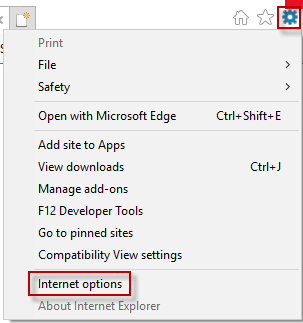 3. Click General tab
4. In Browsing History section
5. Click Delete button
6. Select the required delete options
B. Steps to delete Mozilla Firefox History, Cookies, etc.
From Firefox window:
1. Click Firefox menu (3 horizontal bars - top right corner of window)
2. Click Options
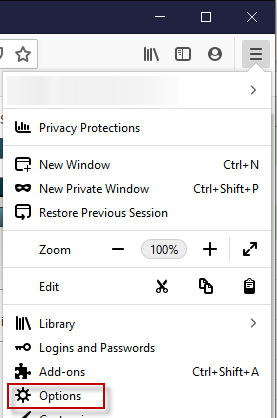
3. Select Options from the menu
4. Select Privacy & Security from menu
5. Review Cookies and Site Data
6. Read Learn More section to determine what is best for user's settings