
WARNING MESSAGE:
Received a Deposit/Receipts, Add to Ledger Warning Message: "One or more itemized records with the amount $00.00 have split categories whose combined amount differs from this check value. Please reassign these category amounts before posting to the ledger."
WHAT DOES THIS MEAN?
There are checks that have been itemized on the itemized screen that were split between categories but the total split amount is not equaling the check amount.
To fix on the itemized check screen, click on the pencil icon beside the category name field
 Confirm total is balanced. If not, adjust the category amounts so that the total split equals the total of the check.
User should not get far enough to receive the above-noted warning.
PROCESS:
Correct Process: Itemizing a Check
1. The check total is $23.00.
2. If the changed amounts to not balance the check total, Balance amount will indicate an amount.
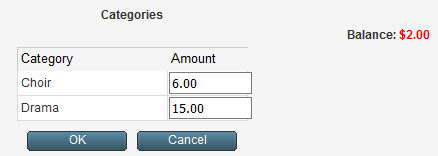
3. If user selects OK button with a balance greater or less than $0.00, the following message displays:
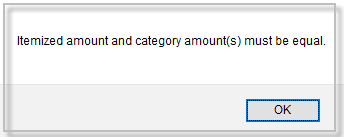
4. User will not be able to save the incorrect entry.